Let your PC do the repetitive work.
Deskbo runs the tasks you repeat every day – sorting files, filling in web forms, downloading reports, backing things up – from a workflow you build by dragging steps into place. No code.
runs on your PCno accountno cloud
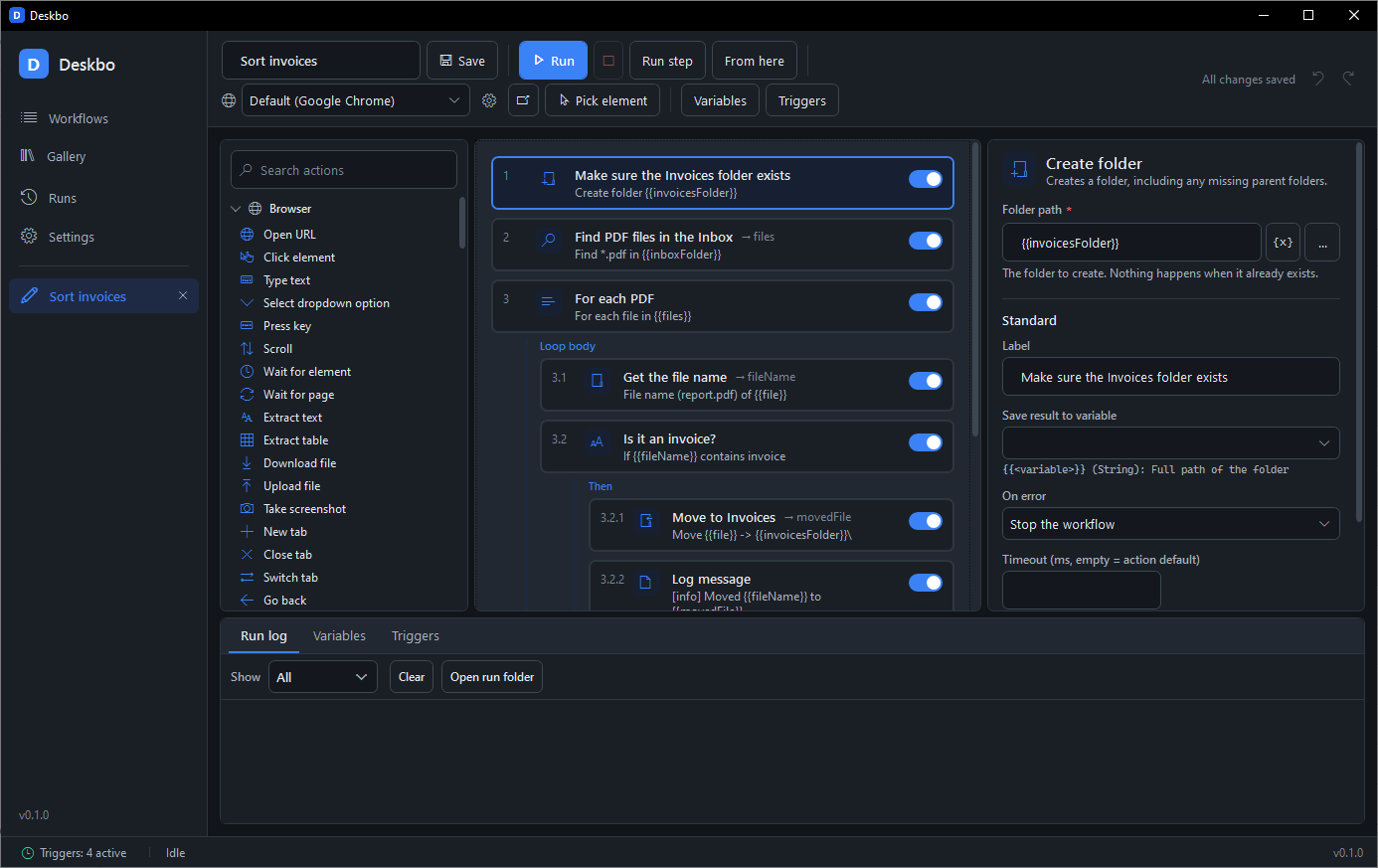
If you do something on your computer more than twice, Deskbo can probably do it for you.
A few everyday examples. Each one is a ready-made workflow in Deskbo: open it, answer one or two questions, press Run.
Organise your photos
Rename 500 holiday photos by date and sort them into folders in seconds.
Grab your invoices
Log in to your supplier's website every month, download the new invoices and save them to the right folder.
Fill in forms for you
Copy customer details from a spreadsheet into a website form, row by row, while you have lunch.
Start your day in one click
Open your e-mail, calendar and favourite apps with one keyboard shortcut.
Never lose your work
Back up important folders every evening, zipped and tidy.
React to changes
When a new file lands in a folder, Deskbo moves it, renames it or sends it wherever it needs to go.
No code. No cloud. No monthly fee.
You pick what to do from a list of ready actions such as "open website", "click", "type" and "copy file", put them in order like building blocks, and choose when it runs. That is all there is to learn.
Who is Deskbo for?
- Small business owners tired of admin work
- Office workers stuck copying data between systems
- Freelancers who want more time for real work
- Families who want organised photos and safe backups
- Tech lovers who want the advanced bits too: conditions, loops, variables and web triggers are all included
What you get
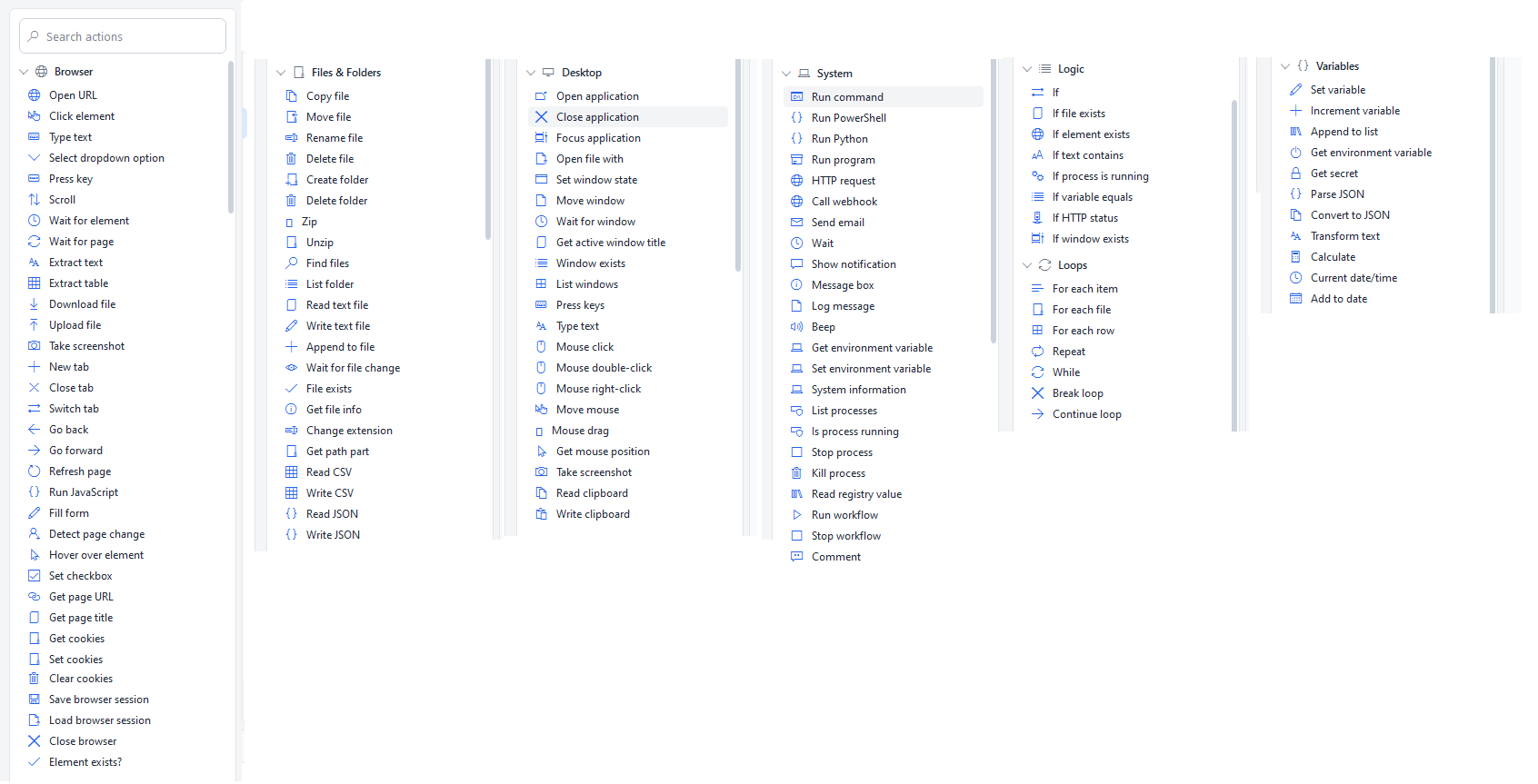
- 125 ready actions for your browser, files, folders, programs and e-mail
- Works with the Chrome or Edge you already have
- Runs now, every morning at 9, when a file appears, when you press a shortcut, or when your PC starts
- Record: do the task once in the browser and the steps write themselves
- Everything stays on your own PC. No account, no server, no AI
- Buy once, use forever. Available in 7 languages
Show it once. Deskbo does it again.
Deskbo uses the Chrome or Edge already on your PC, with your own logins. You do not need to learn anything about how websites are built.
-
Press Record and do the taskLog in, click around, fill in a form. Deskbo writes the steps while you work. Press Stop, and it can repeat them whenever you like.
-
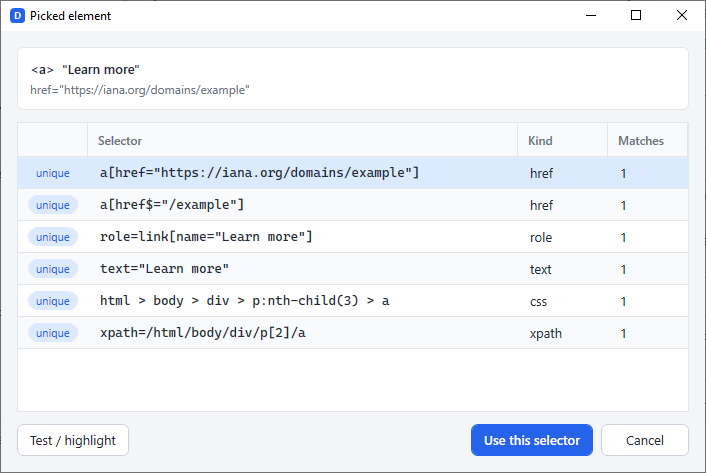
Point and clickNeed to add a step by hand? Click the button or box you mean on the page, and Deskbo remembers it.
-
Check before you runA Test button lights up the part of the page Deskbo will use, so you can see it found the right thing.
Deskbo can also download and upload files, copy tables into a spreadsheet, and stay logged in between runs.
You decide when. Deskbo does the rest.
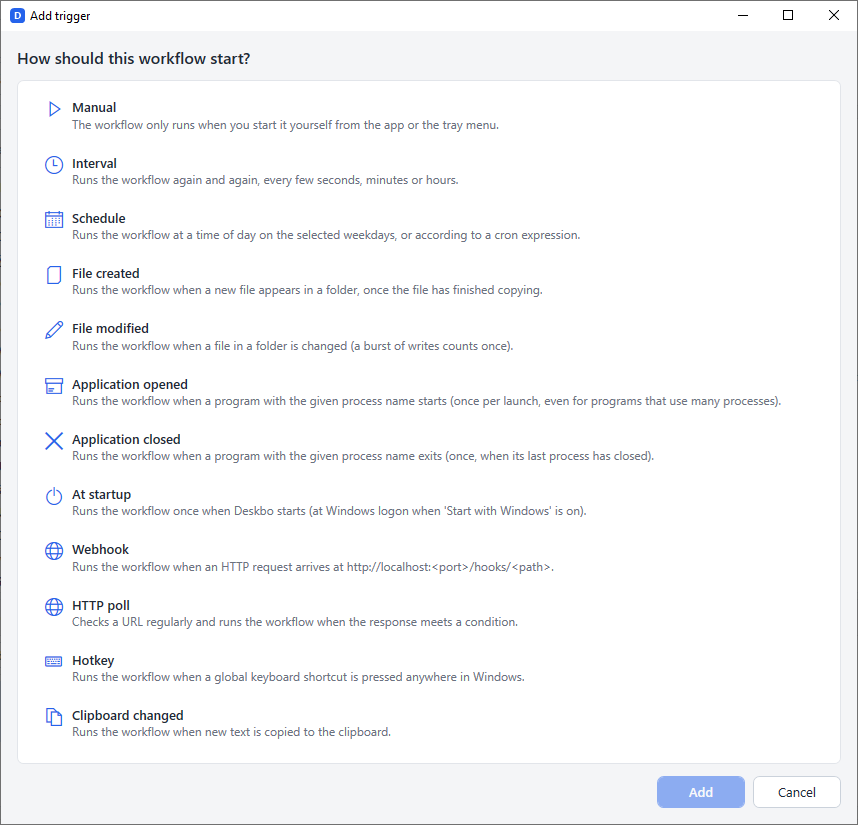
Pick one of these when you save a workflow. Deskbo waits quietly in the background, even when its window is closed, and starts the workflow at the right moment.
Deskbo keeps a simple history of every run, so you can always see what happened and when.
Three simple steps.
No code, no jargon. Most people have their first workflow running within a few minutes.
Pick what to do
Choose from ready-made actions such as "open website", "click", "type", "copy file" and "take screenshot". There are 125 of them, in plain words.
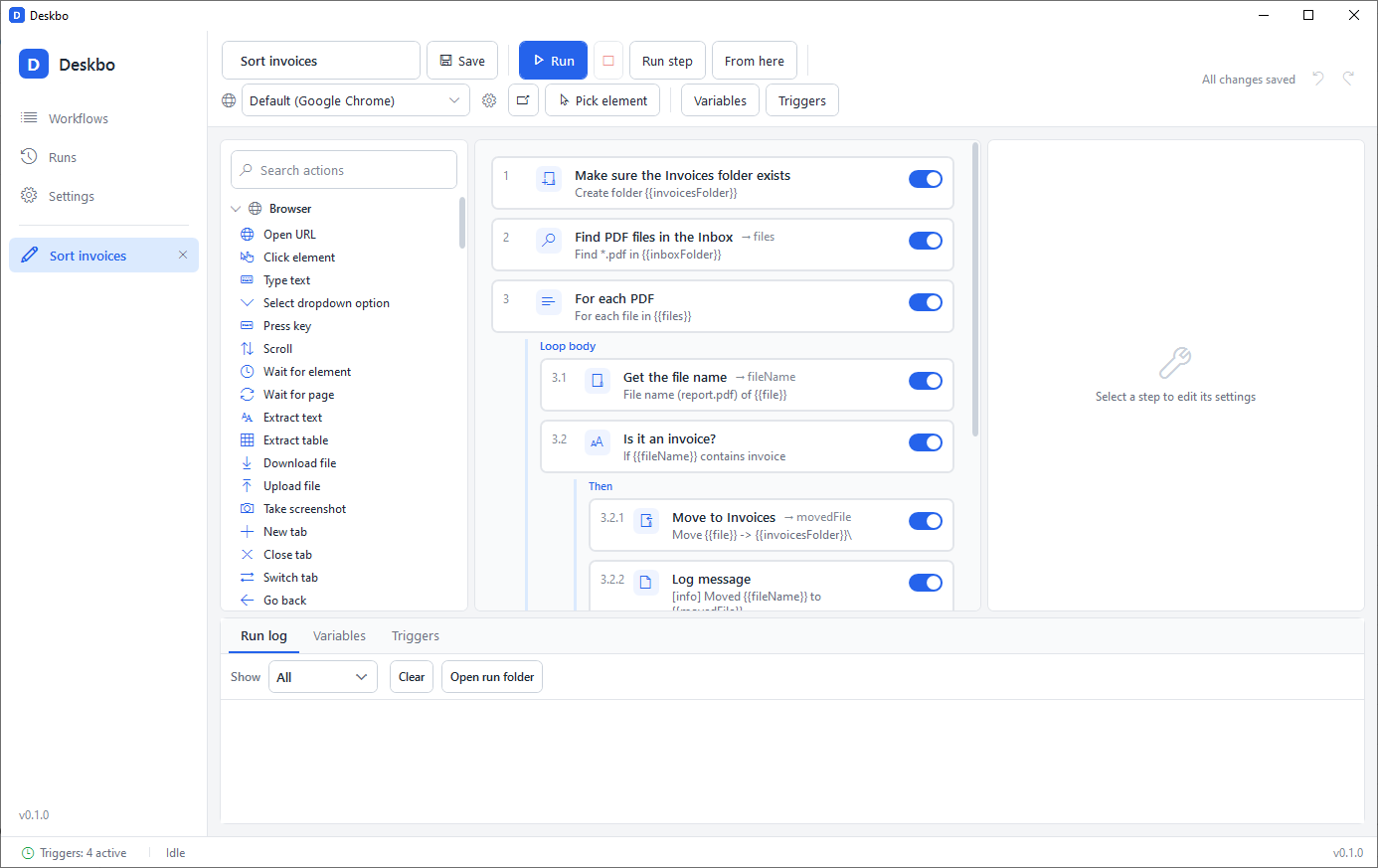
Put them in order
Drag and drop the steps like building blocks, in the order you would do them yourself. Press Run to watch it work.
Choose when it runs
Run it now, every morning at 9, when a file appears, when you press a shortcut, or when your PC starts. That's it. Deskbo takes it from there.
Start with a workflow that already works.
The Gallery inside Deskbo holds 28 ready-made workflows. Pick one, answer one to three plain questions such as "Which folder?" or "How often?", and it is ready to run. Every template can be changed later, step by step.
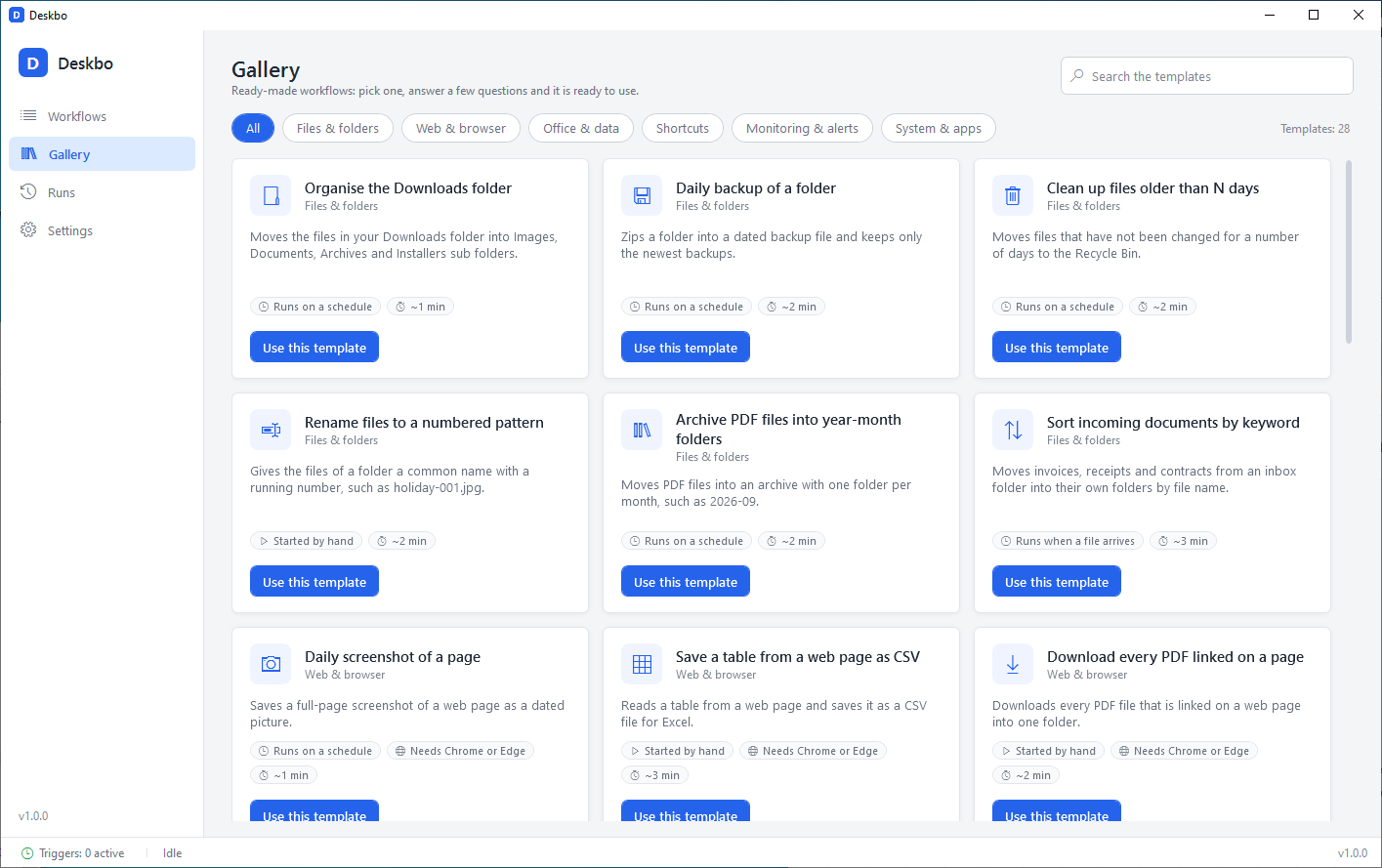
Six groups: Files & folders, Web & browser, Office & data, Shortcuts, Monitoring & alerts, System & apps. New templates arrive with updates.
Your data stays yours.
Deskbo is a program on your PC, not a service. There is nothing to sign up for and nothing leaves your machine unless a step of your own workflow sends it.
Runs locally
Workflows run on your computer, in your browser, with your files. No Deskbo servers are involved.
Plain JSON files
Every workflow is a readable file you can back up, copy to another PC, put in version control or edit by hand.
No account, no cloud, no telemetry
Deskbo does not phone home. It does not collect usage data and does not need you to log in.
Secrets encrypted by Windows
Passwords and API keys are stored with Windows DPAPI, readable only by your Windows user on that machine, and masked in every log.
"steps": [
  { "type": "file.find", "label": "Find PDFs", "parameters": { "folder": "{{inboxFolder}}", "pattern": "*.pdf" }, "outputVariable": "files" },
  { "type": "loop.forEach", "parameters": { "list": "{{files}}", "itemVariable": "file" }, "children": { "body": [ … ] } }
]
Light or dark, your language.
Switch the theme or the interface language in Settings and every open window follows at once – no restart. "Follow Windows setting" tracks your system's app mode live.
- enEnglish
- deDeutschGerman
- frFrançaisFrench
- esEspañolSpanish
- ruРусскийRussian
- trTürkçeTurkish
- hiहिन्दीHindi
The toolbox, step cards, property editors, trigger panel and tray menu are translated. Run logs and error messages stay in English so they are easy to search and share.
Pay once. Keep it.
A perpetual licence, no subscription. Planned prices for the public release; a free 14-day trial will be available at launch.
Personal
For your own PCs at home or at work.
Perpetual licence, planned price
- 1 user, 2 PCs
- All 125 actions and 12 triggers
- All 1.x updates included (one major line)
- Use at work allowed
Pro
For people who rely on Deskbo every day.
Perpetual licence, planned price
- 1 user, 2 PCs
- All 125 actions and 12 triggers
- All future major versions included
- Priority e-mail support
Both licences may be used commercially. Free 14-day trial with every feature, no card and no account needed. Move a licence between PCs any time with Deactivate this PC.
Deskbo is Windows-only (10 and 11, 64-bit). It does not run on macOS or Linux and does not drive Firefox.
Hear when Deskbo is available.
Version 1.0 is feature-complete with more than 1,100 automated tests; licence activation, the 14-day trial and automatic updates are built and being tested. Leave your e-mail address and we will tell you when the download and the trial are ready.
One e-mail at launch, maybe one or two before. No newsletters, no sharing. Privacy
Questions people ask.
Which versions of Windows does Deskbo run on?
Windows 10 and Windows 11, 64-bit. Deskbo is built on .NET 8, which does not run on Windows 7 or 8, so those are not supported. The .NET 8 Desktop Runtime is required; the installer is planned to install it when it is missing.
Which browsers can it automate?
Google Chrome, Microsoft Edge, Brave, Opera, Vivaldi and Chromium – the copy that is already installed on your PC. Deskbo does not ship its own browser. By default it uses a persistent profile, so a site you logged into once stays logged in for the next run.
What about Firefox?
Not in this version. Firefox is detected but reported as unsupported; only Chromium-based browsers can be automated. Edge is installed with Windows, so every supported PC has at least one browser that works.
Is there a macOS or Linux version?
No. Deskbo is a Windows application and there are no plans for other platforms at the moment.
Does it work offline?
Yes. Deskbo runs entirely on your PC and needs no connection to any Deskbo service. Only steps that use the internet themselves – opening a web page, an HTTP request, sending an e-mail – need one.
Can I use it at work or for clients?
Yes. Both the Personal and the Pro licence allow commercial use. A licence is for one named person and covers up to 2 PCs (Personal and Pro alike); deactivate a PC in the settings to move the licence to another one.
How do updates work?
Deskbo checks a signed update feed once a day and installs new versions from Settings › Updates with one click, no administrator rights needed. Personal includes every update of one major line (a 1.x licence covers 1.0, 1.1, 1.2, …); a later 2.x upgrade licence covers 2.x. Pro includes all future major versions. Your workflows are plain files and stay where they are.
Is there a trial?
Yes: a free 14-day trial with all features starts automatically on the first launch. No card and no account are needed. Sign up above and we will tell you when the download is ready.